Sunday, 21 May 2017

Tuesday, 25 April 2017
Apache Kafka Part 1 Webserver --> Using Flume ( Kafka Channel )--> HDFS (Same server)
Apache Kafka comes into picture because traditional messaging system don't scale up to handle big data in real time.
Developed by Linkedin engineers .
Apache Kafka is a distributed messaging framework that meets the demands of big data by scaling on commodity hardware .
Best for real-time use cases
Lets look into a example where we need to extract data from webserver and put into HDFS .
1) If your webserver resides on the same Hadoop Cluster .
Webserver --> Using Flume ( Kafka Channel )--> HDFS
# Sources, channels, and sinks names as source1,channel1,sink1
# agent name, in this case 'logagent'.
logagent.sources = source1
logagent.channels = channel1
logagent.sinks = sink1
# spooldir Source Configuration
logagent.sources.source1.type = spooldir
logagent.sources.source1.spoolDir = /log/C_12345
# the hostname that Flume Syslog source will be running on
logagent.sources.source1.host = localhost
# the port that Flume Syslog source will listen on
logagent.sources.source1.port = 5040
#Bind the source to the channel
logagent.sources.source1.channels = channel1
# HDFS Sink configuration
logagent.sinks.sink1.type = hdfs
logagent.sinks.sink1.hdfs.path= hdfs://<hadoop Cluster IP>/flume
logagent.sinks.sink1.hdfs.fileType =DataStream
logagent.sinks.sink1.hdfs.useLocalTimeStamp =true
logagent.sinks.sink1.hdfs.rollInterval =600
#Bind the sink to the channel
logagent.sinks.sink1.channel = channel1
# Kafka Channel Configuration
logagent.channels.channel1.type =org.apache.flume.channel.kafka.KafkaChannel
logagent.channels.channel1.capacity = 10000
logagent.channels.channel1.transactionCapacity = 1000
logagent.channels.channel1.brokerList = kafkaf-2:9092,kafkaf-3:9092
logagent.channels.channel1.topic = channel1
logagent.channels.channel1.zookeeperConnect = kafkaf-1:2181
logagent.channels.channel1.groupId = flume2
Save this as logagent.conf and save to conf directory in my case the path is /hadoop/inst/apache-flume-1.6.0-bin/conf/logagent.conf
Login to your hadoop cluster ->
Go to flume directory -> then type below command
.flume-ng agent --conf /hadoop/inst/apache-flume-1.6.0-bin/conf/ -f /hadoop/inst/apache-flume-1.6.0-bin/conf/logagent.conf -Dflume.root.logger=INFO ,console -n logagent
--conf /hadoop/inst/apache-flume-1.6.0-bin/conf/
syntax : --conf <path of flume conf folder >
-f /hadoop/inst/apache-flume-1.6.0-bin/conf/logagent.conf
syntax : -f <path of logagent.conf file>
-Dflume.root.logger=INFO ,console
This is to print all the messages on the console .
-n logagent
syntax : -n <name of the agent > // Note : not the conf file name
In the next blog -> we will see how to fetch records from external server and put into hdfs .
Thursday, 20 April 2017
Something About Amazon Web Services (AWS)
Something about AWS:
We all must have knowledge or hear that Cloud Computing is the future . Lets understand the famous Cloud service provider i.e. Amazon.
Cloud computing provides a simple way to access servers, storage, databases, and a broad set of application services over the Internet.
1. As you all know about Jeff Bezos (one of the Richest Man ) who started AMAZON.
2. Amazon officially launched Amazon Web Services (AWS) in 2006.
3.Amazon Web Services is a secure cloud services platform, offering compute power, database storage, content delivery and other functionality to help businesses scale and grow.
4.Their services operate from 16 geographical regions across the world & they are planning to add two more region i.e. Paris and Sweden this year.

Screenshot showing Services and features count of AWS
AWS owns and maintains the network-connected hardware required for these application services, while you provision and use what you need via a web application.
Trade capital expense for variable expense:
Instead of investing heavily in data centers and servers before you know how you're going to use them, you can pay only when you consume computing resources and pay only the amount you consume.
Benefit from massive economies of scale:
By using cloud computing, you can achieve a lower variable cost than you can get on your own. Because usage from hundreds of thousands of customers is aggregated in the cloud, providers such as Amazon Web Services can achieve higher economies of scale, which translates into lower pay-as-you-go prices.
Stop guessing capacity:
Eliminate guessing about your infrastructure capacity needs. When you make a capacity decision before deploying an application, you often end up either sitting on expensive idle resources or dealing with limited capacity. With cloud computing, these problems go away. You can access as much or as little as you need and scale up and down as required with only a few minutes's notice.
Increases speed and agility :
In a cloud computing environment, new IT resources are only ever a click away, which means you reduce the time it takes to make those resources available to your developers from weeks to just minutes. This results in a dramatic increase in agility for the organization, because the cost and time it takes to experiment and develop is significantly lower.
Stop spending money on running and maintaining data centers:
Focus on projects that differentiate your business, not the infrastructure. Cloud computing lets you focus on your own customers, instead of on the heavy lifting of racking, stacking, and powering servers.
Go global in minutes:
Easily deploy your application in multiple regions around the world with just a few clicks. This means you can provide a lower latency and better experience for your customers simply and at minimal cost.
Monday, 17 April 2017
Hadoop Info - Be interview ready - One Active Namenode
4) Interview might ask that why not using two active nodes at a time in a HA cluster .
You can refer this link : About HA Cluster (High Availability Cluster)
Answer :
There should be only one active Namenode running in HA cluster .
If there are two active Namenode running in cluster then its lead to corruption of the data. This scenario is termed as split-brain scenario.
To overcome this problem we can use fencing (Its a process of ensuring that only one Namenode remains active)
Hope you like my articles . Please comment and like.
Sunday, 16 April 2017
Hadoop Info - Be Interview Ready - YARN came before 2.x version
3. Do we know that before 2.0 , YARN, Kerberos security,HDFS federation & Namenode HA features are already there ?
Answer :
In November 2011, version 0.23 of Hadoop was released.that has these features but that was not that matures as 2.0 version . Hence 0.23 upgraded to stable version and name as 2.0.

Friday, 14 April 2017
Hadoop Info - Be Interview Ready- Hadoop Production Master node
Hope you visited my previous blog on High Availability Hadoop Cluster
2. You are working as a Hadoop Developer , but do you know that what will be the minimum configuration required for Production Master node if you are working in Small Hadoop Cluster /Medium Hadoop Cluster / Large Hadoop Cluster ?
Answer :
If you are working with less than or equal to 25 nodes its consider as Small Hadoop Cluster.
Cluster upto 400 nodes consider as Medium Hadoop Cluster
Cluster above 400 nodes consider as Large Hadoop Cluster
Minimum configuration required for Production Master Node :
This is for Small Cluster :
Dual quad-core 2.6 Ghz CPU
32 GB of DDR3 RAM
This is for Medium Cluster :
Dual quad-core 2.6 Ghz CPU
64 GB of DDR3 RAM
This is for Large Cluster :
Dual quad-core 2.6 Ghz CPU
128 GB of DDR3 RAM

Hadoop Info - Be Interview Ready - HA Cluster
1) Share your knowledge about HA cluster .
This features comes in 2.0 and above Apache Hadoop version .
Before that Namenode is the single point of failure means that if Namenode unavailable then whole cluster become unavailable.
To again it to work , manually we have to restart the Namenode services.
This High Availability architecture provides the solution to our problem that is allowing us to have two Namenodes.
1. Active Namenode
2. Passive Namenode ( Also called as Standby Namenode)
So now your cluster is having two Namenodes . If one Namenode unavailable/down then you have other Namenode to take over the work and thus reduce the cluster down time.
This should be possible only when both Namenode shares the same metadata information.
Next Hadoop Info share on 15/04/2017 . Be in touch .
Please comment or like as well . To make articles more accurate for Hadoop lovers ( Data lovers) .
Sunday, 9 April 2017
Core Java - 1/10
This blog will help to refresh Core Java Knowledge .
Hadoop Framework was designed using Java . This is because it is a prerequisite for Hadoop Learning.
In this blog we will take useful keywords which will help in your Hadoop Journey.
Before starting lets learn the naming convention used in Java :
1. Class name & Interface name should start with Upper Case.
2. Method name & Variable name should start with Lower Case.
If the name of the Class,Interface,Method or Variable will be combination of two words then second word should start with Capital Letter .
Example : sumCalculator is a Method Name .
1. Break :
This will break the current loop . Lets take the below example
public class FoodMarket {
public static void main(String args[]) {
String [] fruits = {"Apple","Orange","Pineapple"};
for(String f : fruits ) {
if( f == "Pineapple"){
break;
}
System.out.print( f );
System.out.print("\n");
}
// After the break statement control will come here.
}
}
Output :
Apple
Orange
As we see from the above example :
1. We have created a fruits array of String type of length 3 ( we can find that using fruits.length method)
2.for(String f : fruits) here f is a String variable . f will hold 3 values as fruits array is of 3.
3.First loop f is holding Apple ( f=Apple) in first loop then it compares f with "Pineapple" as condition false so it will ignore the if block and proceed for System.out.println statements which returns print the value of f .
4.Second loop f is holding Orange ( f=Orange) in second loop then it compares f with "Pineapple" as condition false so it will ignore the if block and proceed for System.out.println statements which returns print the value of f .
5.Third/last loop f is holding Pineapple ( f=Pineapple) in third loop then it compares f with "Pineapple" as condition true so it will execute the if block , in the if block there is break; so it will go out of current loop i.e for(String f : fruits )
2. Continue :
The difference between Break and Continue is that Continue will break the block and continue from the current loop.
Lets take the below example
public class FoodMarket {
public static void main(String args[]) {
String [] fruits = {"Apple","Orange","Pineapple"};
for(String f : fruits ) {
if( f == "Orange"){
continue; // This block will skip and continue for loop with // next value
}
System.out.print( f );
System.out.print("\n");
}
}
}
Output :
Apple
Pineapple
Explanation : As soon as it see the continue statement in the block only that block will be skipped . And it will continue loop with the next value.
Next class we will look into Object and Class
Tuesday, 28 March 2017
Apache Hive
Apache Hive - Data Analytical Tool
- Data Warehouse
Famous as Initially developed By Facebook then contributed to Apache and SQL Like Queries
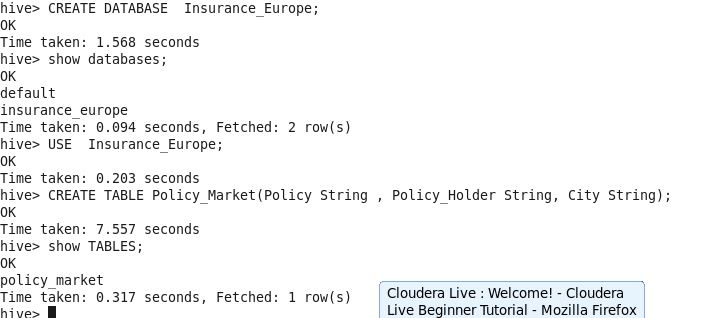
In this Hive Blog - We will help you with Creation of Database ,Tables then Loading of data into table and display all data from Hive Table.
1. Lets enter into Hive Shell :

2. To see the databases we use show databases command .
default is default databases. If we don't define any database then table create in default database.

3. Create a new Database as Insurance_Europe and Table as "Policy_Market"
4. We normally store the Database details in hdfs location : /user/hive/warehouse as below :

We can see from the above image that insurance_europe.db named directory created under /user/hive/warehouse.
Also as we created a table inside that database , new directory created as policy_market.
5. Drop Table and create same table name as policy_market with 5 fields .

6. Load data from local into table policy_market .

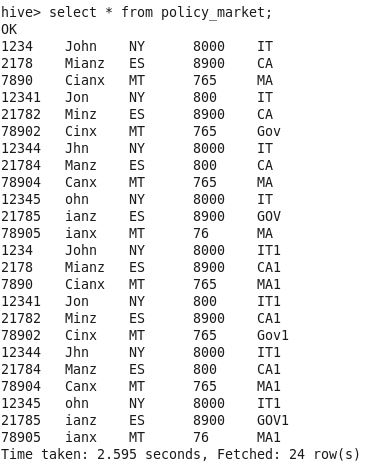
7. Display all data from table policy_market
Great !! Hope you like this blog .
In the next Hive blog we will cover the Static and Dynamic Partition .
Monday, 27 March 2017
PostgreSQL
Its a Open source relational database management system ( DBMS )
This blog is specially target for Sqoop .
Sqoop is a special tool designed on the top of Apache Hadoop which is used to transfer data from Any RDBMS to hdfs/hive/Hbase and vise versa.
In Sqoop we may asked to fetch whole table or specific columns from table for that we must aware about RDBMS select query .
In this Blog we focus on PostgreSQL :
SELECT Queries :
To fetch all records from Customer_Benefits table :
SELECT * FROM Customer_Benefits;
Using AND and OR :
SELECT * FROM Customer_Benefits
WHERE policy = 'Child Endowment'
AND region = 'NY' OR product_id ='4343';
Comparison :
SELECT * FROM Customer_Benefits
WHERE benefits_id > 3 AND premium = 4000;
Alternative to BETWEEN using Comparison :
SELECT name FROM Customer_Benefits
WHERE premium >= 5000 AND premium <= 9070;
Using CASE :
 SELECT benefits_id,
 CASE WHEN benefits_id=70 THEN 'Old'
 WHEN benefits_id=89 THEN 'Old'
 ELSE 'Fresh'
 END AS old FROM Customer_Benefits;
Using CASE,LIMIT :
SELECT customer_name,
CASE WHEN premium > 4000 THEN 'over $4000.00'
WHEN premium = 4000 THEN '$4000.00'
ELSE 'under $4000.00'
END AS premium_range
FROM Customer_Benefits
LIMIT 20;
Comparison <= ,!= :
SELECT * FROM Customer_Benefits
WHERE premium <= 9000 AND policy != 'Diamond life';
Using DISTINCT :
SELECT DISTINCT policy FROM Customer_Benefits;
Using DISTINCT ON ,ORDER BY:
SELECT DISTINCT ON (policy) policy, date
FROM Customer_Benefits
ORDER BY policy, date DESC;
Retrieves the most recent report for each policy. But if we had not used ORDER BY to force descending order of date-time values for each policy, we'd have gotten a report from an unpredictable time for each policy. The DISTINCT ON expression(s) must match the leftmost ORDER BY expression(s). The ORDER BY clause will normally contain additional expression(s) that determine the desired precedence of rows within each DISTINCT ON
group.
Using EXCEPT :
SELECT policy FROM Customer_Benefits
EXCEPT
SELECT policy FROM Customer_Benefits
where benefits_id > 3;
Using EXPLAIN :
EXPLAIN SELECT * FROM Customer_Benefits WHERE customer_name LIKE 'J%';
Using GROUP BY :
SELECT city, max(premium)
FROM Customer_Benefits
GROUP BY city;
Using HAVING :
SELECT city, max(premium)
FROM Customer_Benefits
GROUP BY city HAVING max(premium) < 4000;
Using HAVING and INNER JOIN :
SELECT count(e.policy) AS "number of policy",
p.name AS customer_name
 FROM Policy_Detail AS e INNER JOIN Customer_Benefits AS p
ON (e.p_id = p.id)
GROUP BY customer_name
HAVING count(e.policy) > 1;
Using IS NULL :
SELECT * FROM Customer_Benefits WHERE customer_name IS NULL
Using LIKE :
SELECT * FROM Customer_Benefits
WHERE customer_name LIKE ('%s');
SELECT * FROM employee WHERE name LIKE '%D____;
Using UNION :
SELECT customer_name FROM Customer_Benefits where benefits_id = 1
UNION
SELECT customer_name FROM Customer_Benefits where benefits_id = 2
LIMIT 11;
Hadoop - Processing
Start your Big Data Learning journey from here with us . Home Page : Dive into Big Data Hadoop
Hadoop - Processing i.e. MapReduce
In this blog we will discuss on latest MapReduce framework which is MR2 (above 2.0 versions).
Brief on MapReduce :
Life cycle of data being processed through the MapReduce framework :

1. Creation of input split
2.Mapper
3.Combiner
4.Partitioner
5.Shuffle and Sort
6.Reducer
Lets explain above cycle using example :
1. Assume that we have a 384 GB of data to process .
File : Customer_Data.csv
Fields : CustomerID,Name_of_the_customer,Product,Price,Date_of_Purchase
Sample Data : 001,Tony Bridge,Apple 7,49990,Amazon,1/4/2017
002,Smita Arora Singh , Apple 7 Plus , 60000,Ebay,1/4/2017
2. Input Split : At this stage data will divide to process in parallel.
Input Split is nothing but the Splitting of input data in logical partition .
Example: As we have consider we have 384 GB of data and default setting of block size as 128 MB.
Physical Partitions : 384GB /128 MB = approx 3000 parts
But there may be possibility that your parts1 and parts2 makes a complete record ,then this inputSplit concepts come into picture and parts1 and parts2 will become InputSplit 1 and so on .
That means it is Input Split is logical partition of data.
Record Reader : This Depends on the InputFormat default is TextInputFormat. Lets consider we have not set any Input format then it takes as TextInputFormat.
Note :We have to understand this concept that anything input to Mapper & Reducer should be in the form of (Key,Value) format .
Record Reader as name specify read a single record at a time .
As the Input format is TextInputFormat then it will do as below :
(Key ,Value )
( 0,001,Tony Bridge,Apple 7,49990,Amazon,1/4/17)
(44,002,Smita Arora Singh , Apple 7 Plus , 60000,Ebay,1/4/17)
where key as offset of data and value as actual record.
3. Mapper : This requires input in Key-Value Pair. It will pick each records from Input Split and Process it . Each Mapper will run for each records in the Input Split.
Syntax:
public class Mapper<KEYIN,VALUEIN,KEYOUT,VALUEOUT>
extends Object
Assume the requirement is to find total number of product sale till date.
Example :
Input of Mapper :
( 0,001,Tony Bridge,Apple 7,49990,Amazon,1/4/17)
Key : 0
Value :001,Tony Bridge,Apple 7,49990,Amazon,1/4/17
public class RetailMapper
extends Mapper<Object, Text, Text, IntWritable>{
private final static IntWritable one = new IntWritable(1);
private Text Product = new Text();
public void map(Object key, Text value, Context context) throws IOException, InterruptedException
{
String parts=value.toString().split(",");Product = parts[1]
context.write(Product, one);
}
}
Sample Mapper Output :
Apple 7 , 1
Apple 7 Plus , 1
Samsung S8 , 1
Description of Mapper Phase :
1.Split Values with comma (,) delimiter.
2. Consider Product as a Key and rest of values as One
Key : Product
Value : One
As we can see that this not gives the required output . Remaining part of the coding will be in Reducers phase .
4.Combiner : This phase is also called as Mini Reducer . The combiner should combine key/value pairs with the same key. Each combiner may run zero, once, or multiple times.
There might be situation where Mapper is producing lots of output files to process in that case we can use Combiner . So that reducer has to process less files .
Example : Lets assume there are 500 Mappers and 1 Reducer and your task is to minimize the time required by reducer to process the data or minimize the total job time.
In order to this we can use Combiner in our Map-Reduce Program.
This phase is also use to optimize the Map-Reduce code .
5. Partitioning : The mechanism of sending which output of Mapper to which Reducer is called Partitioning.
Default Partitioner uses a hashing on the keys to distribute them to the reduce tasks, but you can override it and use your own custom Partitioner.
Custom Partitioner Example :
For this we need to implement "getPartition(Text key, Text value, int numPartitions)"
Let consider product having cost less that 50K should go to Reducer1 and product cost more than 50K go to Reducer2.
Then method would be like as follow :
public int getPartition(Text key, Text value, int numPartitions)
{
String parts=value.toString().split(",");
String Product_Cost = parts[2]
int p_cost =Integer.parseInt(parts[2]);
if((p_cost>=1)&&(p_cost<=50000))
return 0;
else
return 1;}
6.Shuffle and Sort :
Shuffling and sorting are not performed at all if you specify zero reducers (setNumReduceTasks(0)). Then, the MapReduce job stops at the map phase, and the map phase does not include any kind of sorting.
The shuffle and sort phase is done by the MapReduce framework. Data from all mappers are grouped by the key, split among reducers and sorted by the key. Each reducer obtains all values associated with the same key.
7.Reducer :
The reducer obtains sorted key/[values list] pairs, sorted by the key. The value list contains all values with the same key produced by mappers. Each reducer emits zero, one or multiple output key/value pairs for each input key/value pair.
Syntax :
public class Reducer<KEYIN,VALUEIN,KEYOUT,VALUEOUT>
extends Object
Lets complete our requirement which is remaining in Mapper Phase :
public class IntSumReducer<Key> extends Reducer<Key,IntWritable,
Key,IntWritable> {
private IntWritable result = new IntWritable();
public void reduce(Key key, Iterable<IntWritable> values,
Context context) throws IOException, InterruptedException {
int sum = 0;
for (IntWritable val : values) {
sum += val.get();
}
result.set(sum);
context.write(key, result);
}
}
Reducer Output as <Key:Product, Value :Sales till date>:
Apple 7 , 78909889
Apple 7 Plus , 67978979
Samsung S8, 7898789
Now we have the Total product sales till date .
Saturday, 11 March 2017
Dive into Big Data - Hadoop
To start your journey towards big data / hadoop you have to follow following steps :
1. Brush up Core Java and SQL .
2. Basic unix commands . For this you can refer this link Basic Unix Commands
Big Data = This is the combination of Big + Data . We already have RDBMS to handle data but now we are getting digital data from everywhere around the world that makes data big . This is Big Data .
To store and process we have a powerful Java framework called as HADOOP .
Who has created - Doug Cutting
Where - Yahoo
When - 2006
How ? its goes to open source as it was Yahoo product .
Yahoo later provided Hadoop to Apache foundation and now this is the top level open source project in Apache.
Hadoop
|
|
----------------------------------------------
| |
Storage Processing
(HDFS) (MapReduce)
1. Storage : For storage of big data , hadoop uses HDFS i.e. Hadoop Distributed File System .
2. MapReduce : This framework is designed in Java to process large size data in parallel.
We will look both in detail :
1. Storage : Refer this link Hadoop Storage
2.MapReduce: Refer this link Hadoop Processing -MapReduce
Hadoop Ecosytem Tools :
1.Data Analytical Tool : Hive
Apache Hive is a Open source Data Warehouse infrastructure built on top of Apache Hadoop for providing data summarization, query, and analysis.
This tool was initially developed by Facebook . Later they have contributed to Apache .
This tool is used for structure type of data .
Refer this link : Apache Hive
Download Hive from Original Apache website : apache/hive/hive-2.1.1/
2. Data Transformation Tool : Pig
This tool is for structure as well as semi -structure data .
3. Data Ingestion Tool : Sqoop
Its a Open Source , Product from Apache .
Full name of Sqoop i.e SQ+OOP = SQL to HADOOP
This tool is used to transfer data from Relational Database to Hadoop supporting storage system and vice versa .
Interesting facts about SQOOP : It is not used only with open source framework i.e. Hadoop but also used by industry giant like below :
1. Informatica provides a Sqoop based connector .
2. Pentaho provides open source Sqoop based connector.
3. Microsoft uses a Sqoop based connector to help transfer from Microsoft SQL Server DB to Hadoop.
and many more ...
Refer this link : SQOOP
Also refer this link to Refresh your PostgreSQL Knowledge . This Link will help you to go through from the all SELECT queries to fetch record from RDBMS ( i,e, PostgreSQL) to transfer data into Hadoop distributed File system , hive or No Sql database like HBASE.
4.Data Ingestion Tool : Flume (Coming Soon)
This is also a Data Ingestion Tool but this tool is used to transfer the semi-structure data from any web server to hdfs/hive/HBASE .
Example : Apache Log file stored in remote web server can be transfer using Flume to HDFS .
Apache Kafka :
First lets go through how we can use Kafka channels in Flume as a reliable and highly available channel for any source/sink combination.
Refer this blog : Kafka Channel in Flume
In this blog you will get to know how to transfer data from webserver to hdfs
5.NoSql Databases (Coming Soon)
Hadoop - Storage
Hadoop - Storage i.e. HDFS ( Hadoop Distributed File System)
This framework supports Distributed File System that means now your data can store in multiple location .
These are the few things which you need to consider while working in HDFS :
1.Block size : This is the splitting data size which you need to decide at the time of Hadoop configuration on your cluster . Default is 128 MB ( Hadoop Version 2)
If block size was set to less than 64 , there would be a huge number of blocks throughout the cluster,
This causes master machine to manage an enormous amount of metadata.
Configuration parameter & Value :
dfs.blocksize = 134217728
Above value is in bytes ( equivalent to 128 MB)
Configuration file :
hdfs-site.xml
<property>
  <name>dfs.blocksize</name>
  <value>134217728</value>
</property>
Example :
1. Block size : 128 MB (Which is default)
Suppose you have 1 GB of data = 1024 MB
Now if you have set block size as 128 then there will be 8 Blocks created
Your data information is stored by Master Machine like on which slave machine your data is stored.
2. Block size : 32 MB
Suppose you have 1 GB of data = 1024 MB
Now if you have set block size as 32 then there will be 32 Blocks created
As you see now Blocks increases so Master Machine has to keep information about 32 Blocks data.
Note : It is advisable to use Block size of 128 MB or more .
2. Block Replication :
Using this we can create replications / backup for the blocks .
Configuration parameter & Value :
dfs.replication = 3
This is the default value of dfs.replication in case not provided.
Configuration file :
hdfs-site.xml
<property>
  <name>dfs.replication</name>
  <value>3</value>
</property>
Example :
When it can be useful :
If any of the slave machine data corrupts or off (i.e. unable to provide data ) then this replication parameter plays a important role.
Lets see how process works :
Suppose we have the data of 256 MB that means if block size is 128 MB then it will create 2 blocks ( as we learnt above )
Now if we have configured replication factor as well that means now your 2 blocks replicates on 3 machines .
Now if any of the one slave machine corrupt you have the data on other 2 slave machines .
3. File System Permissions :
In hdfs you will be required to set file permission : If we need to provide all access to Owner and only read and execute access to Group and Other then we set value as 022 .
<property>
  <name>fs.permissions.umask-mode</name>
  <value>022</value>
</property>
As we can see its a 3 digit no (022) , where 0 - for Owner 2 - Group & 2 - for Other.
we have 0 to 7 number representing type of permission below :
0 : read, write and execute1 : read and write2 : read and execute3 : read only4 : write and execute5 : write only6 : execute only7 : no permissions
Suppose if we give 077 as fs.permissions.umask-mode then it means 0 - read,write and execute for Owner
7 - no permissions for Group
7 - no permissions for Other
4.
For more number of parameters please refer Apache Hadoop - hdfs-site.xml parameters
Saturday, 24 December 2016
Top Level Unix Directories
Following are the some of the most used directories :
| Dir | Description |
|---|---|
| / | This is called as "root" . In the file system hierarchy this is the starting point . |
| /bin | This contain Binaries files or executable programs. |
| /etc | This contain System level configuration files |
| /home | This is Home directories |
| /tmp | This contain temporary files |
| /usr | This contain user related files or programs |
| /var | This contain variable data like logs files |
Friday, 23 December 2016
Basics Unix command helpful in hadoop
Following are the some basic commands which will help you in Hadoop :
| Command | Usage | Description |
|---|---|---|
| su | This is called as switch user .Syntax : su username Example : su auhadoop | This will help you to change user or switch user |
| pwd | This is called as present working directory .Syntax : pwd Example : pwd | This will help you to identify your present working directory |
| ls | This is called as List . Syntax : ls /directory_path Example : ls /user/ or ls / | List the directories or files present in mentioned directory |
| cd | This is called as change directory .Syntax : cd / or cd /Path Example : cd / or cd /user | This will change directory which ever path you mention after cd |
| mkdir | This is called as make directory .Syntax : mkdir /directory_name Example : mkdir /Input | This will create a new directory |
| touch | This is called as touch .Syntax : touch /directory_name/file_name Example :touch /user/file1.txt | This will create a new file |
| rmdir | This is called as remove directory .Syntax : rmdir /directory_name Example : rmdir /Input | This will remove directory |
| rm | This is called as remove .Syntax : rm /directory_name/file_name Example : rmdir /Input/inputfile.txt | This will remove file |
| chmod | This is called as change mode .Syntax : chmod 777 /directory_name or file_name Example : chmod 777 /input.txt | This will used to provide read , write and execute permission to directory or file . |
| cat | This is called as cat.Syntax : cat /File_name Example :cd /input.txt | This will show the content of the file . Note : This is only used with files . |
| mv | This is called as move.Syntax : move /Sourcefolder/file_name /Targetfolder Example :mv /user/file1.txt /test/ | This will move file from one directory to another directory / This will also be used to rename the file Syntax : move Currentfilename newfilename Example : mv fileold.txt filenew.txt |
| cp | This is called as copy.Syntax : copy filepath /destination_directory_path Example :cp /input.txt /test/ | This will copy file to new location |
Subscribe to:
Posts (Atom)