Monday, 8 March 2021

Conversion of Kafka topics from JSON to Avro with KSQL

 Here’s a dummy topic, in JSON:

$ kafka-console-consumer --bootstrap-server localhost:9092 --from-beginning --topic mysql_users
{"uid":1,"name":"Cliff","locale":"en_US","address_city":"St Louis","elite":"P"}
{"uid":2,"name":"Nick","locale":"en_US","address_city":"Palo Alto","elite":"G"}

In KSQL declare the source stream, specifying the schema (here a subset of the full schema, just for brevity):

ksql> CREATE STREAM source (uid INT, name VARCHAR) WITH (KAFKA_TOPIC='mysql_users', VALUE_FORMAT='JSON');

 Message
----------------
 Stream created
----------------

Now create a derived stream, specifying the target serialization (Avro) and the target topic (this is optional; without it will just take the name of the stream):

ksql> SET 'auto.offset.reset' = 'earliest';
Successfully changed local property 'auto.offset.reset' from 'null' to 'earliest'
ksql> CREATE STREAM target_avro WITH (VALUE_FORMAT='AVRO', KAFKA_TOPIC='mysql_users_avro') AS SELECT * FROM source;

 Message
----------------------------
 Stream created and running
----------------------------
ksql>

Check out the resulting Avro topic:

$ kafka-avro-console-consumer \
                   --bootstrap-server localhost:9092 \
                   --property schema.registry.url=http://localhost:8081 \
                   --topic mysql_users_avro --from-beginning
{"UID":{"int":1},"NAME":{"string":"Cliff"}}
{"UID":{"int":2},"NAME":{"string":"Nick"}}

Because KSQL is a continuous query, any new records arriving on the source JSON topic will be automatically converted to Avro on the derived topic.

Friday, 4 December 2020

Azure updates #6 : Microsoft Azure is Multiple Cloud

Microsoft Azure is Multiple Cloud
how?
It consists of four different Microsoft Azure Cloud- Public, US Gov, China and Germany
To get a listing of all the different clouds under the Microsoft Azure umbrella, you can run the following Azure CLI command:
az cloud list --output table
The command will output the names Microsoft gives to all of the Microsoft Azure clouds.
IsActive Name Profile
---------- ----------------- ---------
True AzureCloud latest
False AzureChinaCloud latest
False AzureUSGovernment latest
False AzureGermanCloud latest
  1. Public Azure Cloud - We all aware about this - 60+ Regions as of today.
  2. Azure US government Cloud - Consists of 8 Azure Regions
  3. Azure German Cloud - The Azure German Cloud is a sovereign cloud that consists of 2 Azure Regions that are located in German
  4. Azure China Cloud - The China Azure Cloud is a sovereign cloud that consists of 4 Azure Regions that are located in China

Wednesday, 21 October 2020

Azure updates #5 : The number of Azure regions (announced) to 65.

Continuing Azure’s big expansion into Europe, they just announced a data center being built in Austria!


https://techcrunch.com/2020/10/20/microsoft-azure-announces-its-first-region-in-austria/


This brings the number of Azure regions (announced) to 65. Good to see Europe getting extensive local cloud coverage.

Wednesday, 14 October 2020

Azure updates #4 - Azure Data Explorer now support Compute Isolated SKUs - published on 13th October 2020

What that mean is? 

Azure Data Explorer provides support for isolated compute using SKU Standard_E64i_v3. 

Isolated compute virtual machines (VMs) enable customers to run their workload in a hardware isolated environment dedicated to single customer. 

Who can use this? 

Clusters deployed with isolated compute VMs are best suited for workloads that require a high degree of isolation for compliance and regulatory requirements.

Isolated compute support is available in the following regions:

West US 2

East US

South Central US

Note -  compute SKU(s) offer isolation to secure data without sacrificing the flexibility in configuration

Tuesday, 13 October 2020

Azure updates #3 - Row Level Security now generally available for Azure Data Explorer -Published on 12th October 2020

 What that mean is?

You can now prevent specific users from viewing certain rows in a table, and you can also mask the data they see.

Where this can be used?

Projects or companies use this to implement GDPR - Right to object article and Anonymization 

What is the right to object?

You have the right to object to an organization processing (using) your personal data at any time.

What is Anonymization?

Anonymization is the process of masking data.

In that case, we can restrict the user or group to access the data by allowing Row-level Security. This works the similar way as we use Apache Ranger to restrict the user or group to access the data by applying Row-level filtration and Masking Policy. 

Saturday, 10 October 2020

Azure updates #2 - Azure Files premium tier is now available in more regions with LRS, ZRS, and NFS support -Published on 9th October 2020

 With 60+ announced regions, more than any other cloud provider, Azure makes it easy to choose the datacenter and regions that are right for our customers.


The premium tier is now available in 32 Azure regions


This is a useful link if anyone would like to explore Products available by region

https://azure.microsoft.com/en-us/global-infrastructure/services/?products=storage&regions=all

Friday, 9 October 2020

Azure updates #1 - Azure Blob Storage -Soft Delete for Containers preview region expansion -Published on 8th October 2020

For quick reference, when we create a Azure Storage account, we can see following options - Containers(for blob), Files, Tables and Queues.


When container soft delete is enabled for a storage account, any deleted container and their contents are retained in Azure Storage for the period that you specify. During the retention period, you can restore previously deleted containers and any blobs within them.

Follow my blog for more updates on the Cloud. 

Tuesday, 6 October 2020

Azure Cloud Use Case : Big data analytics with optimized Apache Spark 3.0 (Azure Databricks) - 3 hours

Thanks for your interest in learning Cloud & Big Data.

Here in this session, we are going to cover Big data analytics with optimized Apache Spark (Azure Databricks).


Unlock insights from all your data and build solutions with Azure Databricks, 

Azure Databricks supports Python, Scala, R, Java, and SQL, as well as data science frameworks. 

In this 3 hr of the session, we are going to discover

1.     About Microsoft Azure

2.     Azure Portal Tour

3.     Architecture overview and services

4.     About Storage Accounts

5.     About Blob Storage account

6.     Setup Blob Storage account

7.     Upload data into Azure Blob Storage and apply permissions so that other Azure services can access this data.

8.     Overview on Spark Framework

9.     Supporting languages – Python, Java, and Scala

10. About Azure Databricks

11. Setup Databricks cluster [Latest Apache Spark™ 3.0]

12. Which Free tool can be used to prepare an Architecture diagram


                                                                  Fig - 1

Please share this with your friend circle and let's help them to learn Cloud.

How to set up a free Azure Account - https://bigdatajourney.blogspot.com/2020/09/create-your-microsoft-azure-free.html


Payment details :
Accepting PAYTM or google Pay : +91 9881160721.
For international participants accepting PayPal-

Contact me for details (amitdassit@gmail.com)

Please email me or WhatsApp me(+91 9881160721) with a screenshot that you have transferred. Also please follow me on this blog to get the latest updates on all 3 public cloud providers or next Cloud session. 
Once I receive your mail/WhatsApp, give me a day to share Google Meet invite/ Zoom invite / Skype invite.

 First Batch - Sunday 11th September - 4 PM IST or 11:30 UK Time (Full)

Second Batch - Sunday 18th October - 4 PM IST or 11:30 UK Time (Full)

 Third Batch - Saturday 24th October - 4 PM IST or 11:30 UK Time (few seats remaining)

Guidance will be provided if anyone interested to know "How to apply for UK jobs from India" 


Hurry up. Limited seats are available.


Cloud Market share Q2 2020 -


 Email me on amitdassit@gmail.com if interested (Also email or comment below if interested in AWS, Azure, or GCP training in reasonable fees)


Monday, 28 September 2020

FREE FREE FREE Microsoft Azure Certification Vouchers

Details are here in this video -

Please subscribe, like, and share 
This will give me the motivation to add more video free to my audience. 

Happy  Learning!!


Are you looking for cloud courses - AWS/Azure or Google Cloud? you came to the right place
Email me now - amitdassit@gmail.com

Tuesday, 22 September 2020

Create your Microsoft Azure free account today

Congratulations you come to right place. Lets start learning something new! :) 

Here are the steps-

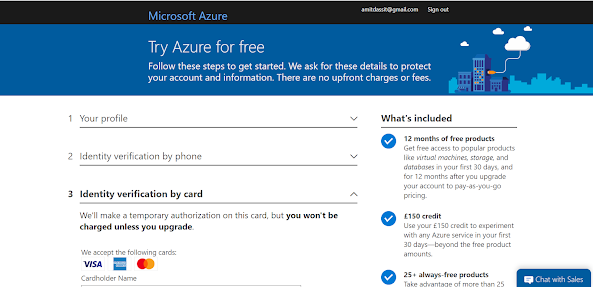
Create your Azure free account today :

 1.       Microsoft Azure link to create free account. https://azure.microsoft.com/en-gb/free/search/?&ef_id=CjwKCAjw-5v7BRAmEiwAJ3DpuAW5HO-n2eZS4KW0y2dGYwCrMtDHFEBCQEP2ZCO6WVGpa0RQe-Iq3xoCyKgQAvD_BwE:G:s&OCID=AID2100128_SEM_CjwKCAjw-5v7BRAmEiwAJ3DpuAW5HO-n2eZS4KW0y2dGYwCrMtDHFEBCQEP2ZCO6WVGpa0RQe-Iq3xoCyKgQAvD_BwE:G:s


2.  


            2. Click on “Start for free”

3.      3.  Fill all the information to get ready for free Azure Account for a month (they will ask to add Debit or Credit card details to ensure that you are genuine customer).

For me it is showing £150 as free credits as I am based in United Kingdom. For India, it will show $200 free credits.


         4. Ready with Azure Account (https://portal.azure.com/#home)


Any query feel free to email me on : amitdassit@gmail.com 

Happy Learning

Monday, 21 September 2020

Cloud Migration - SQL Database to Azure NoSQL Database(Cosmos DB) - 3 hours

Thanks for your interest in learning Cloud.

Here in this session we are going to cover Cloud Migration - Azure SQL Database to Azure NoSQL Cosmos DB.

Azure Cosmos DB is a low-latency, high throughput, globally distributed, multi-model database which can scale within minutes and offers 5 consistency options to let you decide how to deal with the CAP theorem.

Do you know how Netflix stores TV shows information. They are using Documentdb which is NoSQL DB to store complex objects.
Example -
Level 1 TV Shows is a complex object
Level 2         - Inside that many seasons
Level 3                 - Many Episodes
Level 4                             - Reviews
Level 4                             - Cast Members
 
In this 3 hr of session we are going to discover

1. About Microsoft Azure.
2. Azure Portal Tour
3. Architecture overview and services used in Cloud Migration.
4. Setup Azure Blob Storage
5. Setup Azure SQL database account
6. Setup Azure Cosmos DB
7. Upload data into Azure Blob Storage and apply permissions so that other Azure services can access this data.
8. Using the Bulk insert mechanism, transfer all data into Azure SQL database.
9. Using Migration tools, transfer all data from SQL database to NoSQL database(Azure Cosmos DB)
10. Which Free tool can be used to prepare Architecture diagram (Refer following Architecture which we are going to cover)

image.png  

Please share this with your friend circle and let's help them to learn Cloud.

How to set up a free Azure Account - https://bigdatajourney.blogspot.com/2020/09/create-your-microsoft-azure-free.html

Payment details :
Accepting PAYTM or google Pay : +91 9881160721.
For international participants accepting PayPal(£20/$25) -Contact me for details (amitdassit@gmail.com)

Please email me or WhatsApp me(+91 9881160721) with a screenshot that you have transferred an amount INR 1499. Once I receive your mail, give me a day to share Google Meet invite/ Zoom invite / Skype invite.

First Batch - Sunday 27th September - 4 PM IST or 11:30 UK Time (Completed)
Second Batch - Sunday 11th October - 4 PM IST or 11:30 UK Time (24 seats available)

Guidance will be provided if anyone interested to know "How to apply for UK jobs from India

Hurry up. Limited seats available

Email me on :  amitdassit@gmail.com if interested (Also email or comment below if interested for AWS, Azure or GCP training in reasonable fees)

Wednesday, 10 July 2019

Making Apache Spark™ Better with Delta Lake

Are we missing ACID transactions in big data technologies. 

We dont have to as - Databricks, founded by the original creators of Apache Spark™ has recently open sourced yet another exciting technology: Delta Lake

What this Delta Lake is
Data lakes typically have multiple data pipelines reading and writing data concurrently, and data engineers have to go through a tedious process to ensure data integrity, due to the lack of transactions. Delta Lake brings ACID transactions to your data lakes. It provides serializability, the strongest level of isolation level.

It is a storage layer that brings reliability to data lakes and provides:
 •    ACID transactions
 •    scalable metadata handling
 •    unified streaming and batch data processing. 

Delta Lake runs on top of your existing data lake and is fully compatible with Apache Spark APIs.

What Existing Data Lake can be compatible with this - 
Existing Data Lake can be HDFS , Azure Data Lake Storage(WASB) ,Amazon S3 etc . 

Soon we have FULL DML support - Delta Lake supports standard DML including UPDATE, DELETE and MERGE INTO providing developers more controls to manage their big datasets.

One more -  Apache Spark™ is forecast to grow at a 67% CAGR from 2019 to 2022.


Friday, 6 April 2018

Sqoop : Split-by - only numeric columns ?

Hi All ,

For better parallelization,  Sqoop forces to use numeric -split by column .

But in real world you may end up with non numeric columns in your source table . In that we can set following Textsplitter properties to true in our Sqoop import command :

Dorg.apache.sqoop.splitter.allow_text_splitter=true

This we use for non-numeric split-by column . 


Hope you like the article .

Till then Keep Coding Keep Healthy 

Comment and Like Guys!!

Tuesday, 27 March 2018

SQOOP Part II

(What is Hadoop and its ecosytem tools - this is the place for all your answers - Know about Hadoop - A Big Data Handling Framework )

Sqoop Part I


Hey Hi All , Welcome to SQOOP Part II 


Lets start with the main requirement importing data from Mysql table -Customers to hdfs . 

Syntax : sqoop import --connect jdbc:mysql://localhost/<database> --username <uname> -P --table <table name> --target-dir '/directory/'

Command : sqoop import --connect jdbc:mysql://127.0.0.1/InsuranceEuropeDB --username root -P --table Customers --target-dir '/CustomersData'


Ops !! Fail as No Primary key found for table Customers .  (I should have to ask Primary key details as a third questions from Onshore coordinator looks like this table does not have any)

So why it require Primary Key ??

- >  As we know we are using SQOOP so that multiple threads run and do our tasks fast. Primary key holds unique and not null data which helps SQOOP to decide how many mapper required to process the whole data in equal distributed manner .

Example :

1. With Duplicate data :

1    2   2    3    3    3   7   9    

Suppose above data we are getting as Rating from Movies . ( Sqoop Default Mapper = 4 )

Sqoop calculates Min  -  1
                            Max  - 9  


mapper 1  -  1 to 2    - 3 records 
mapper 2  -  3 to 4     - 3 records
mapper 3 - 5 to 6      - no records 
mapper 4  - 7 to 9      - 1 records 

Now you can see that some mapper processing 3 times than other like mapper1 process 3 records and mapper4 only single records , also look mapper3 enjoying bench (sitting idle). Thats the reason SQOOP forces to use Primary Key . 

2. Null 

if there are NULL in the fields which we used to decides mapper  , it will also do same as above process . Some Mapper will process more data some less . 

3. Primary Key - Unique and Not null 

 11 12 13 14 15 16 1 2 3 4 5 6 7 8 9 10

Suppose above data we are getting as Rating from Movies . ( Sqoop Default Mapper = 4 )

Sqoop calculates Min  -  1
                            Max  - 16     (16 / 4  = 4 records /Mapper)


mapper 1  -  first 4 records    - 4 records 
mapper 2  -  then 4 records     - 4 records
mapper 3 - then 4 records      - 4 records 
mapper 4  - 4 records     - 4 records 

So as far we understand that Primary Key field is needed to run the SQOOP job but for creating Parallelism (Divide the data equally for each Mapper )

So can we run above job , which fail (Primary Key not found in Customers Table )

There are solutions as we cannot change source table . 

1. Pass number of Mapper as 1 (Which is defaults to 4 )

2 . Search any field in table which we can use to create Parallelism to some extents . ( next blog)

1. Pass number of Mapper as 1 (Which is defaults to 4 )

sqoop import --connect jdbc:mysql://127.0.0.1/InsuranceEuropeDB --username root -P --table Customers --target-dir '/CustomersData' -m 1


Observe these two new members :

1 ) --target-dir '/CustomersData'   - It will create CustomersData folder . 

If folder already exists then you need to remove CustomersData folder and then run the job . Otherwise you will come accross this error as well shown below :


2) Now lets meet second member that is  [m -1]

That means we are asking SQOOP to use only one mapper for transfering data from MYSQL to hdfs location . 

That's completed my assigned tasks . 

As per discussion , I need to mail Onshore Team with hdfs path . 

Morning Team ,

Hope you are doing good . 

As per the request , we have completed the task . Please find the details as below :

HDFS Path : \CustomersData

Attaching Screenshot also with this mail having hdfs path .


We will discuss one more method in (next blog)  along with if any new requirements ;) 

Till then Keep Coding Keep Healthy 

Comment and Like Guys!!